
AI Copilot: functions and capabilities
AI Copilot provides assistance with support questions, programming and troubleshooting in horstOS. For practical examples, see AI Copilot: use cases.
Introduction and fundamentals
AI Copilot is an assistance and training tool for programming and setting up applications with HORST. It supports general questions, navigation in horstOS and assistance with troubleshooting.
Main functions
- AI Support: Answers to software questions and help with navigation in horstOS.
- AI Programming: Program code and step-by-step instructions.
- AI Error Handling: Diagnosis and suggested solutions for error messages.
AI Support
General software questions
- Answers and instructions: Guidance on programming and using horstOS.
- Orientation for new users: Help with getting started and finding functions in the software.
- Example: “How do I program a pallet?”
General questions about fruitcore robotics products
- Product information: Access to assembly instructions and technical documentation for fruitcore robotics products.
- Setup assistance: Information for commissioning and configuring systems.
- Example: “How much weight can I install on the MRB S?”
System-wide search and navigation in horstOS
- Finding functions: Assistance with locating menus, settings and functions.
- Settings menus: Guidance through configuration options and settings.
- Example: “How should I set my robot's controller values?”
Component management
- Component information: Information about devices integrated into the system and their configuration.
- Quick reference: IP addresses and configuration data for peripheral devices.
- Example: “What is my camera's IP address?”
Extensions planned in the source article
The following items were described as planned extensions in the source article from July 2024. Their current availability needs a separate version check.
- Context-sensitive assistance: Recognising the user's current screen and offering relevant help without an explicit request.
- Application information: Considering the robot model and current settings to provide more specific information.
AI Programming
Code generation
- Code output: Generates textual program code for specific tasks.
- Program integration: Generated code can be transferred into the robot program.
- Example: “How do I program a circle with a diameter of 5 cm?”
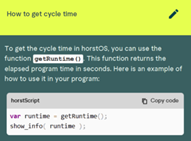
Ideas for solving problems
- Templates and examples: Code examples that illustrate possible implementations.
- Learning assistance: Help with understanding and adapting code snippets for a particular application.
- Example: “How do I program an automatic material feed?”
Step-by-step instructions
- Programming guidance: Instructions for programming functions without directly generating code.
- Complex tasks: Assistance with complex program structures and user-defined settings.
- Example: “How do I set up a user-defined coordinate system?”
Optimisation suggestions
- Code analysis: Suggestions for improving existing code and its efficiency.
- Performance improvements: Identification of potential bottlenecks and suggestions for improving cycle time.
- Example: “How can I reduce the cycle time of my pick-and-place application?”
Extensions planned in the source article
These items were described as planned extensions in July 2024; the source article does not establish their availability in a current release.
- Context menu for textual programming: Further assistance accessible through a context menu.
- Code explanation: Explanations of selected code sections.
- Code completion: Assistance with completing code segments.
- Syntax error analysis: Identification of syntax errors and proposed solutions.
AI Error Handling
Error diagnosis and resolution
- Error analysis: Recognition of horstOS error messages and suggested solutions.
- Direct assistance: Guidance through the steps needed to resolve an error.
- Example: “My robot displays the error message 'JOINT_OVERLOAD' — how do I resolve it?”
Extension planned in the source article
Source references: The July 2024 article described a planned extension that would identify the data source or documentation used for an error analysis. Check its availability for the relevant software version.