
Local vision with PLEXA
Start with your own parts, a camera and the prepared local models on the Readiness Kit PC. Vision Studio connects image collection, labeling, training and inspection in one workspace — for industrial applications, teaching and research.
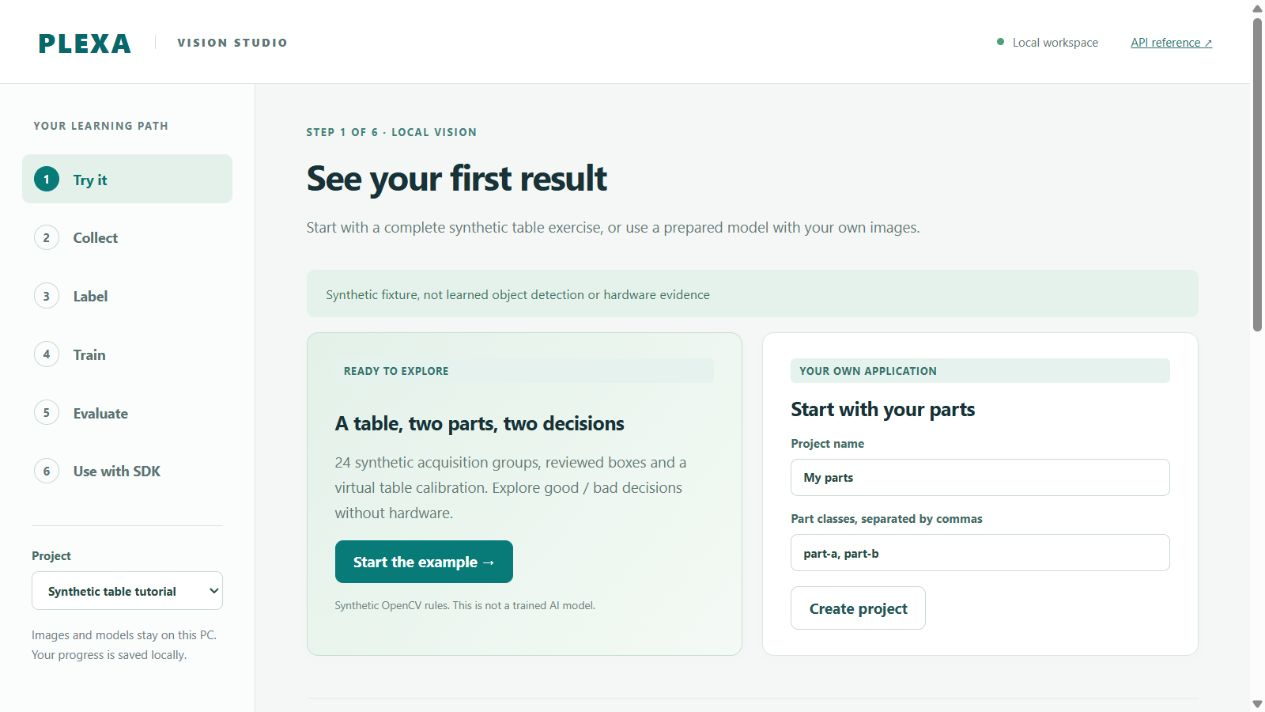
Quickstart: from your part to a robot application
- Open your workspace. Start the prepared Vision Studio on the kit PC. With the local service running, open Vision Studio, create a project and name your part classes.
- Collect and label. Add images of your own parts or capture from your selected camera. Mark the objects and relevant quality classes. Include different part positions and lighting conditions.
- Teach your model. Choose the prepared local model, review the labels and start a training job for your parts. Keep separate images for evaluation.
- Try your inspection. Compare the model's predictions with your test images. Choose how your application should handle a good part, a rejected part or an uncertain result.
- Connect the robot. Use Python or Node.js to turn the inspection result into the next operation: approach a part, sort it or continue the process. For position-based actions, configure the camera-to-robot calibration. Review a motion preview, then explicitly start the configured operation through the Control API.
Vision Studio provides the observations; your robot application uses the Runtime SDK to plan and execute motion. The same workflow can support a quality inspection station or a student project that explores a new model.
Build with Codex or Claude Code
The kit includes Codex, Claude Code and Claude Desktop. Use the prepared assistants to explore the SDKs, understand the project and develop your application with the existing documentation.
A starting prompt for Codex or Claude Code:
Read the local project README and agent instructions. Help me build a Vision Studio project for my own parts using the installed models. Use the existing Python or Node.js SDK to connect inspection results to a robot application. Show the camera, calibration and robot settings I need to supply, prepare a motion preview and let me explicitly start the robot operation.
Coming soon
Detailed camera, labeling, training and robot-application recipes are being prepared. Start with the local workspace and the SDK entry points below.
Prepared kit software · Python SDK · Node.js SDK · Control API